Flag of Austria

eSIM Austria

High-speed 4G / 5G data — instant delivery via email

114 Plans 4G / 5G Instant Email
114
Available Plans
4G / 5G
Network Speed
2 min
Activation
1
How many days will you travel?
Select your trip duration in Austria

Choose the eSIM plan for your trip

5 DAYS
3GB
614MB/day
Data only
$2.52
$2.80 -10%
  • 4G / 5G
  • Unlimited Hotspot
7 DAYS
3GB
439MB/day
Data only
$2.94
$3.27 -10%
  • 4G / 5G
  • Unlimited Hotspot
10 DAYS
3GB
307MB/day
Data only
$3.37
$3.74 -10%
  • 4G / 5G
  • Unlimited Hotspot
5 DAYS
500MB/day
Data only
$2.94
$3.27 -10%
  • 4G / 5G
  • Unlimited Hotspot
7 DAYS
500MB/day
Data only
$4.20
$4.67 -10%
  • 4G / 5G
  • Unlimited Hotspot
10 DAYS
5GB
512MB/day
Data only
$4.63
$5.14 -10%
  • 4G / 5G
  • Unlimited Hotspot
5 DAYS
1GB/day
Data only
$3.78
$4.20 -10%
  • 4G / 5G
  • Unlimited Hotspot
7 DAYS
5GB
731MB/day
Data only
$4.20
$4.67 -10%
  • 4G / 5G
  • Unlimited Hotspot
10 DAYS
500MB/day
Data only
$5.46
$6.07 -10%
  • 4G / 5G
  • Unlimited Hotspot
5 DAYS
5GB
1GB/day
Data only
$3.78
$4.20 -10%
  • 4G / 5G
  • Unlimited Hotspot
7 DAYS
1GB/day
Data only
$5.04
$5.60 -10%
  • 4G / 5G
  • Unlimited Hotspot
10 DAYS
10GB
1GB/day
Data only
$7.00
$7.78 -10%
  • 4G / 5G
  • Unlimited Hotspot
5 DAYS
10GB
2GB/day
Data only
$6.30
$7.00 -10%
  • 4G / 5G
  • Unlimited Hotspot
7 DAYS
10GB
1.4GB/day
Data only
$6.65
$7.39 -10%
  • 4G / 5G
  • Unlimited Hotspot
10 DAYS
1GB/day
Data only
$7.15
$7.94 -10%
  • 4G / 5G
  • Unlimited Hotspot
5 DAYS
2GB/day
Data only
$6.72
$7.47 -10%
  • 4G / 5G
  • Unlimited Hotspot
7 DAYS
2GB/day
Data only
$8.83
$9.81 -10%
  • 4G / 5G
  • Unlimited Hotspot
10 DAYS
2GB/day
Data only
$12.61
$14.01 -10%
  • 4G / 5G
  • Unlimited Hotspot
5 DAYS
3GB/day
Data only
$7.35
$8.17 -10%
  • 4G / 5G
  • Unlimited Hotspot
7 DAYS
3GB/day
Data only
$9.80
$10.89 -10%
  • 4G / 5G
  • Unlimited Hotspot
10 DAYS
20GB
2GB/day
Data only
$12.61
$14.01 -10%
  • 4G / 5G
  • Unlimited Hotspot
5 DAYS
20GB
4GB/day
Data only
$11.21
$12.45 -10%
  • 4G / 5G
  • Unlimited Hotspot
7 DAYS
20GB
2.9GB/day
Data only
$11.91
$13.23 -10%
  • 4G / 5G
  • Unlimited Hotspot
10 DAYS
3GB/day
Data only
$14.00
$15.56 -10%
  • 4G / 5G
  • Unlimited Hotspot
5 DAYS
Unlimited
Unlimited/day
Data only
$11.56
$12.84 -10%
  • 4G / 5G
  • Unlimited Hotspot
  • After cap: 5 Mbps
7 DAYS
Unlimited
Unlimited/day
Data only
$16.11
$17.90 -10%
  • 4G / 5G
  • Unlimited Hotspot
  • After cap: 5 Mbps
10 DAYS
30GB
3GB/day
Data only
$17.16
$19.07 -10%
  • 4G / 5G
  • Unlimited Hotspot
5 DAYS
Unlimited
Unlimited/day
Data only
$14.00
$15.56 -10%
  • 4G / 5G
  • Unlimited Hotspot
  • After cap: 10 Mbps
7 DAYS
30GB
4.3GB/day
Data only
$16.11
$17.90 -10%
  • 4G / 5G
  • Unlimited Hotspot
10 DAYS
Unlimited
Unlimited/day
Data only
$22.76
$25.29 -10%
  • 4G / 5G
  • Unlimited Hotspot
  • After cap: 5 Mbps
5 DAYS
30GB
6GB/day
Data only
$15.06
$16.73 -10%
  • 4G / 5G
  • Unlimited Hotspot
7 DAYS
Unlimited
Unlimited/day
Data only
$19.26
$21.40 -10%
  • 4G / 5G
  • Unlimited Hotspot
  • After cap: 10 Mbps
10 DAYS
50GB
5GB/day
Data only
$27.32
$30.35 -10%
  • 4G / 5G
  • Unlimited Hotspot
5 DAYS
50GB
10GB/day
Data only
$24.52
$27.24 -10%
  • 4G / 5G
  • Unlimited Hotspot
7 DAYS
50GB
7.1GB/day
Data only
$25.91
$28.79 -10%
  • 4G / 5G
  • Unlimited Hotspot
10 DAYS
Unlimited
Unlimited/day
Data only
$27.32
$30.35 -10%
  • 4G / 5G
  • Unlimited Hotspot
  • After cap: 10 Mbps
1 DAYS
1GB/day
Data only
$1.68
$1.87 -10%
  • 4G / 5G
  • Unlimited Hotspot
1 DAYS
2GB/day
Data only
$2.10
$2.33 -10%
  • 4G / 5G
  • Unlimited Hotspot
1 DAYS
3GB/day
Data only
$2.10
$2.33 -10%
  • 4G / 5G
  • Unlimited Hotspot

Showing 40 of 114 plans

How to Use eSIM in Austria

1
Choose Plan
Select the right plan for your trip
2
Checkout
Pay securely online
3
Get QR Code
Instant email delivery
4
Activate
Scan QR and connect

Carriers & network technology by country

Austria
A1, Drei, T-Mobile AT
5G 4G

Carrier and technology data is published per coverage. Multi-country plans should be checked against the plan detail modal. Actual 4G/5G connectivity depends on device, location, and signal quality.

Quick Order
Duration 1 days
Data 500MB
Price $0.84
Secure PaymentSSL Encrypted
100% RefundIf not activated
24/7 SupportAlways here to help
Need Help?

Our team is available around the clock

support@nexaesim.com

Austria eSIM Specifications

Partner networks A1, Drei, T-Mobile AT
Network speed 4G / 5G
Wi-Fi sharing (Hotspot) Supported
Activation deadline Within 60 days from purchase
Package start time Validity counts from the first network connection at destination.
SIM type Data only (no phone number)
Coverage Austria
Delivery Instant QR code by email

Your Essential Guide to Austria eSIMs

Planning a trip to Austria? Stay connected from the moment you land with a NexaEsim. Our prepaid eSIMs offer seamless mobile data across Austria's stunning cities and picturesque landscapes. This guide helps you choose the perfect plan, understand connectivity, and get the most out of your travel eSIM.

Choosing the Right eSIM Plan for Your Austria Trip

Selecting an eSIM involves more than just data and days. Consider your travel style and data needs to find the ideal match among NexaEsim's 114 available plans for Austria. All plans are data-only, support 4G/5G, and include unlimited hotspot functionality.

Plan Type Data Allowance Validity Range Throttled Speed (after high-speed cap) Best For
Daily High-Speed Data 500 MB/day, 1 GB/day, 2 GB/day, 3 GB/day 1 to 30 days 128 Kbps
  • Light Use: 500 MB/day plans are suitable for essential messaging and light browsing.
  • Navigation & Social: 1 GB/day to 2 GB/day plans support navigation, social media, and occasional streaming.
  • Short to Longer Trips: Available for durations from 1 day up to 30 days, offering flexibility for various trip lengths.
Total Data Packages 3 GB, 5 GB, 10 GB, 20 GB, 30 GB, 50 GB 3 to 30 days 128 Kbps
  • Moderate to High-Data Use: Ideal for travelers with predictable data needs over the entire trip, allowing for more intensive use on specific days without daily caps.
  • Longer Trips: Larger packages (e.g., 20 GB, 30 GB, 50 GB) are well-suited for extended stays or heavy data consumption over 15 to 30 days.
Unlimited Data Plans Unlimited (with daily high-speed caps of 1 GB/day or 2 GB/day) 1 to 30 days 5 Mbps (after 2 GB/day cap) or 10 Mbps (after 1 GB/day cap)
  • Heavy Users & Digital Nomads: Provides peace of mind with continuous connectivity, even after exceeding daily high-speed allowances. The throttled speeds (5 Mbps or 10 Mbps) are generally sufficient for standard browsing, messaging, and even some video streaming.
  • All Trip Lengths: Available for durations from 1 day up to 30 days, offering flexibility for extensive usage.

All NexaEsim Austria plans are data-only. For voice calls and SMS, we recommend using popular Voice over IP (VoIP) and messaging applications such as WhatsApp, FaceTime, Google Meet, or Skype, which function seamlessly over your eSIM data connection.

Understanding Austria's Network Coverage & Speed

NexaEsim partners with leading Austrian carriers to provide reliable 4G and 5G connectivity. Understanding how these networks operate can enhance your experience.

Country Partner Carrier(s) Supported Technology
Austria A1, Drei, T-Mobile AT 4G, 5G
Country Partner Carrier(s) Supported Technology
Austria A1, Drei, T-Mobile AT 4G, 5G
  • Partner Networks: NexaEsim utilizes the networks of A1, Drei, and T-Mobile AT across Austria. These carriers offer extensive coverage. The eSIM is designed to automatically connect to the strongest available signal from these partners. Specific regional strengths of each carrier are not provided, but generally, major urban centers and popular tourist areas benefit from robust coverage.
  • 4G vs. 5G Availability: While 4G connectivity is widespread across Austria, 5G connectivity is primarily available in major cities and densely populated areas. Expect seamless 4G connectivity in most other developed areas. Specific regions or cities with reliable 5G availability are not detailed.
  • Realistic Speed Expectations: NexaEsim Austria plans support 4G and 5G speeds. Actual download and upload speeds can vary significantly based on several factors, including your device's capabilities, your exact location within Austria, current network congestion, and the signal quality. While specific typical Mbps figures are not provided, the supported 4G and 5G technologies generally allow for fast browsing, streaming, and video calls under normal conditions. After a plan's high-speed data allowance is consumed, speeds will be reduced to either 128 Kbps (for daily and total data plans), 5 Mbps (for some unlimited plans), or 10 Mbps (for other unlimited plans), as specified in the plan details.
  • Hotspot Functionality: All NexaEsim Austria plans support unlimited hotspot/tethering, allowing you to share your data connection with other devices. Hotspot usage counts towards your plan's daily or total high-speed data allowance. Once this allowance is reached, any subsequent hotspot usage will also be subject to the reduced speeds (e.g., 128 Kbps, 5 Mbps, or 10 Mbps) as per your plan's Fair Usage Policy. The number of devices that can connect via hotspot is not explicitly limited.

Activation, APN, and Troubleshooting Tips

Getting your eSIM up and running is straightforward, but a few details can ensure a smooth experience.

  • Instant Activation: Your eSIM QR code is delivered instantly via email after purchase. We recommend installing it at home over Wi-Fi before your trip. The plan's validity period only begins when it first connects to a supported network in Austria, not upon installation.
  • APN Settings: For all NexaEsim Austria plans, the Access Point Name (APN) is "Orange". In most cases, your device will automatically configure the APN upon eSIM installation. If you encounter connectivity issues, checking or manually setting the APN to "Orange" is a key troubleshooting step. Username and password fields should be left blank unless otherwise instructed.
  • Data Roaming: Upon arrival in Austria, remember to enable "Data Roaming" for your eSIM line in your phone settings. This action is necessary for the eSIM to connect to local partner networks and will not incur extra charges from your NexaEsim plan.
  • eKYC Requirements: None of the listed NexaEsim Austria plans require Electronic Know Your Customer (eKYC) verification.
  • Top-Ups: Top-up options are not listed for the current NexaEsim Austria plans. If you anticipate needing more data than your initial plan provides, it is recommended to purchase a new eSIM plan.

Destination-Specific Connectivity Insights for Austria

Austria offers excellent connectivity, but a few local nuances are worth noting:

  • Urban Connectivity: Major cities such as Vienna, Salzburg, Graz, and Innsbruck boast strong network coverage, including 5G in many areas. Public Wi-Fi is also widely available in cafes, hotels, and public spaces, which can complement your eSIM data for very heavy downloads or when conserving data.
  • Alpine Regions: While coverage is generally good in popular ski resorts and hiking areas, signal strength can vary in remote valleys or high mountain passes due to geographical obstructions. Travelers exploring deep valleys or very high altitudes should be aware that connectivity might be intermittent.
  • Public Transport: Expect reliable connectivity on most intercity trains and major highways, allowing you to stay connected while traveling between destinations.
Reviews

What travelers say about our Austria eSIM

4.8/ 5
Based on 416 reviews
5 326
4 90
3 0
2 0
1 0
R
Ryan Garcia Zurich, Switzerland

Super convenient

No more hunting for a local SIM when I landed in Austria. The speeds easily handled uploading photos and videos. Will be my first choice for future travels.

P
Peter Martinez Copenhagen, Denmark

Perfect for travel

No more hunting for a local SIM when I landed in Austria. It connected automatically every morning without prompting. Brilliant from start to finish.

M
Mia Anderson Munich, Germany

Instant activation

Grabbed this before heading to Austria and it saved me a lot of money. Reception held up even in busy tourist spots. Great value for the price.

Showing 3 of 416 reviews

PREPARE WITH EASE · ENJOY EVERY MOMENT

Stay connected before you even take off.

Check your phone. Estimate your data. Choose an eSIM with confidence.

2 free tools
CHECK YOUR DEVICE

Is your phone ready?

Select the exact model and sales market to check whether it can use eSIM.

This is where the phone was originally sold, not your travel destination.

Checking manufacturer and carrier information.

FAQ

Frequently Asked Questions about Austria eSIM

An eSIM for Austria is a digital SIM that lets you connect to local mobile networks without a physical SIM card. Simply scan a QR code to install it on your compatible device and enjoy high-speed data in Austria.

After purchase, you will receive a QR code via email.

Your plan validity begins when the eSIM first connects to a network in Austria. You can install the eSIM at home before your trip — it will not start counting until you arrive and enable data roaming.

Most modern smartphones support eSIM. Check the full list of compatible devices.

Yes! Most devices support Dual SIM (physical SIM + eSIM). You can keep your home SIM for calls and SMS while using the Austria eSIM for data. Just set the eSIM as your mobile data line in settings.

Many of our Austria eSIM plans support hotspot/tethering.

Our Austria eSIM connects to top-tier local carriers providing 4G / 5G speeds. Actual speed depends on your location, network congestion, and carrier coverage in Austria.

If your data runs out, you can purchase a new eSIM plan.

Yes, we offer 100% refund if not activated. refund policy.

Yes, you need to enable Data Roaming. not incur additional charges — it connects to partner networks in Austria.

We recommend installing the eSIM at home with Wi-Fi before your trip. When you land in Austria, simply turn it on — no scanning needed at the airport.

No problem — your QR code is always available in your order confirmation email. You can re-open it anytime, or contact our 24/7 support and we'll resend it.
eSIM Support Center

Set it up correctly the first time and fix connection issues quickly

These instructions apply to Austria eSIMs on iPhone and Android. Menu names may vary slightly by operating-system version and phone manufacturer.

How to install a Austria eSIM on iPhone and Android

A stable Wi-Fi connection is required to download the eSIM profile. Open the QR code on another device or print it before you begin.

Before installation
  • Use the device checker above to confirm that your phone supports eSIM, is carrier-unlocked and has room for another SIM.
  • Read the package-start condition in the plan details. Do not install too early if validity begins immediately upon installation.
  • Keep the QR code private. Do not delete an installed eSIM before contacting support because many QR codes can be installed only once.
Apple

Install eSIM on iPhone

  1. 1
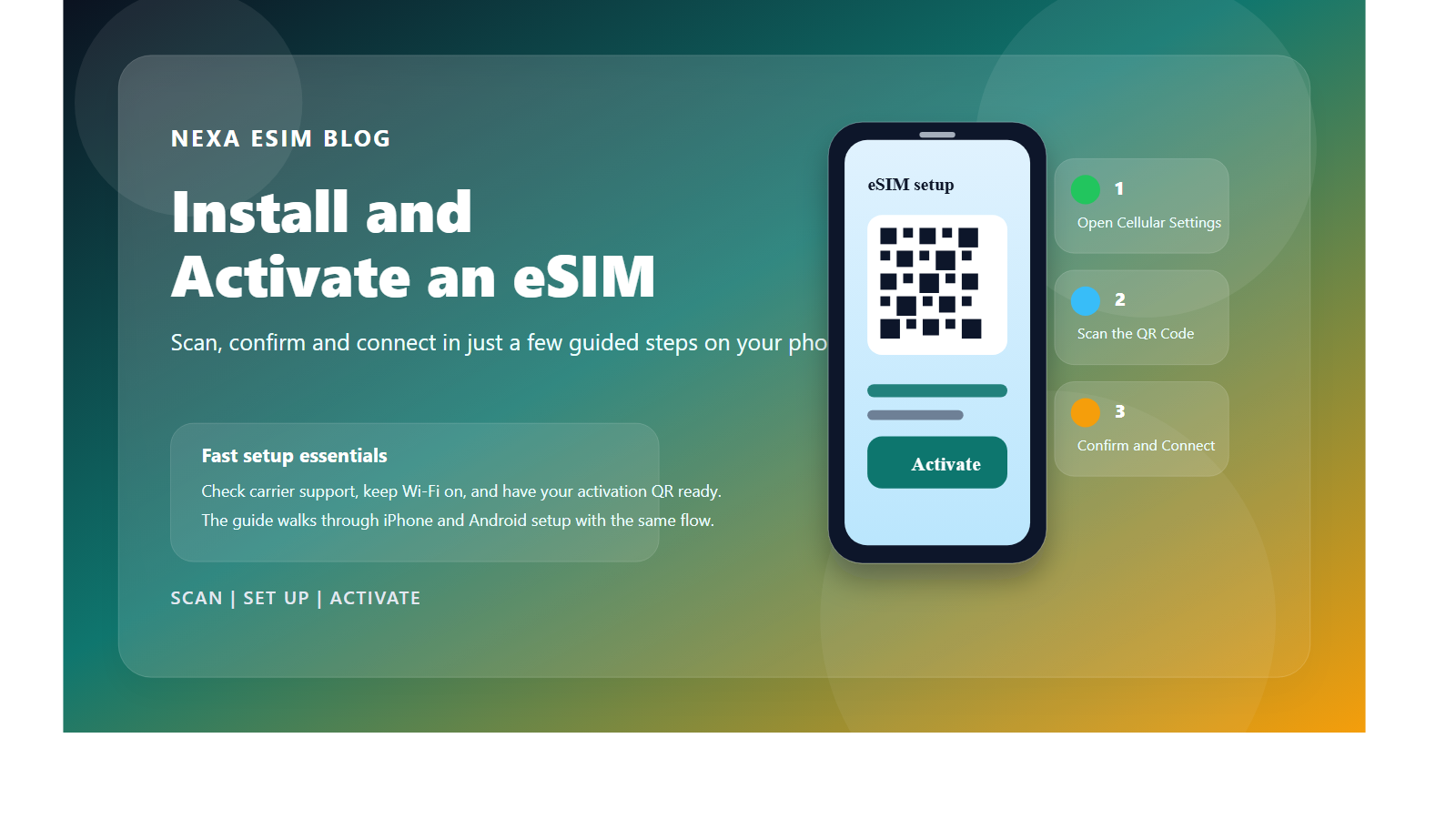
    Open Settings → Cellular (or Mobile Data) → Add eSIM.
  2. 2
    Choose Use QR Code, scan the code from your email and follow the on-screen instructions.
  3. 3
    Give it a clear label such as “Austria eSIM”. Keep your primary SIM as the default voice line if you need calls or OTP messages.
  4. 4
    When you arrive in Austria, select the eSIM for Cellular Data, enable Data Roaming for it and turn off “Allow Cellular Data Switching”.
Samsung, Google Pixel & Android

Install eSIM on Android

  1. 1
    Open Settings → Connections → SIM manager. On Pixel: Network & internet → SIMs.
  2. 2
    Choose Add eSIM and scan the QR code from your order email.
  3. 3
    Select the new eSIM for Mobile data. Keep your primary SIM for calls and SMS if needed.
  4. 4
    At your destination, turn on the eSIM and Data roaming. Leave network selection on Automatic unless support asks you to choose a carrier manually.

After installation, keep the travel eSIM turned off until arrival if the plan should not start yet. Most plans connect automatically when they first reach a supported network in Austria or the purchased coverage area.

Fix an eSIM with no Internet or no network connection

Follow these steps in order so you change only one setting at a time. After each step, wait 30–60 seconds and check the signal indicator and Internet access again.

1Turn on eSIMLine is active
2Select data lineUse the correct eSIM
3Enable roamingFor the travel eSIM
4Refresh networkToggle Airplane Mode
The eSIM is installed but there is no Internet connection

The most common cause is that the phone is still using the primary SIM for data or Data Roaming is disabled on the eSIM.

  1. Confirm that the eSIM is enabled and selected for Cellular/Mobile Data.
  2. Enable Data Roaming on the travel eSIM. You do not need to enable roaming on your primary SIM.
  3. Turn off Wi-Fi, enable Airplane Mode for about 20 seconds, then turn it off and test mobile data.
  4. If the plan requires an APN, enter the APN shown in the email or plan details. Leave username and password blank unless instructed otherwise.
  5. Restart the phone and check that the plan still has validity and high-speed data remaining.
The phone shows “No Service” or cannot register on a network

Make sure you are in a country included in the plan. Open Network Selection, choose Automatic and wait 1–3 minutes.

If there is still no signal, turn off Automatic and try each supported carrier: A1, Drei, T-Mobile AT. Wait at least one minute after each selection.

No supported carrier appears in the network list

Move to an open area, toggle Airplane Mode, restart the device and search for networks manually again. Confirm that your current country is included in the exact plan you purchased.

If other SIMs also have no signal, local coverage may be the cause. Try another location before changing the APN or deleting the profile.

The QR code is invalid, already used or cannot add the eSIM

Make sure the phone has Wi-Fi, supports eSIM, is carrier-unlocked and the QR code was not installed on another device. Check the SIM list because the eSIM may already exist under Travel, Secondary or the provider name.

Do not keep scanning the code and do not delete an eSIM that already appears. Capture the error and contact support with your order number. Never post the QR code publicly.

There is signal, but the connection is slow or unstable

Check remaining high-speed data, switch between 5G Auto and 4G/LTE, and move away from basements, trains or crowded areas. Speed depends on the device, location, network load and plan policy.

Temporarily disable VPN or custom DNS apps. On a multi-country plan, network registration after crossing a border can take several minutes.

Should I delete and reinstall the eSIM when something goes wrong?

No. Many QR codes allow only one installation. Deleting the eSIM may make it impossible to reinstall. Keep the profile and contact NexaEsim before resetting network settings or deleting it.