Flag of Egypt

eSIM Egypt

High-speed 4G / 5G data — instant delivery via email

120 Plans 4G / 5G Instant Email
120
Available Plans
4G / 5G
Network Speed
2 min
Activation
1
How many days will you travel?
Select your trip duration in Egypt

Choose the eSIM plan for your trip

5 DAYS
500MB/day
Data only
$6.34
$7.04 -10%
  • 4G / 5G
  • Unlimited Hotspot
  • After cap: 128Kbps
7 DAYS
1GB
146MB/day
Data only
$3.96
$4.40 -10%
  • 4G / 5G
  • Unlimited Hotspot
10 DAYS
3GB
307MB/day
Data only
$7.67
$8.52 -10%
  • 4G / 5G
  • Unlimited Hotspot
  • After cap: 128Kbps
5 DAYS
3GB
614MB/day
Data only
$6.93
$7.70 -10%
  • 4G / 5G
  • Unlimited Hotspot
  • After cap: 128Kbps
7 DAYS
3GB
439MB/day
Data only
$7.32
$8.13 -10%
  • 4G / 5G
  • Unlimited Hotspot
  • After cap: 128Kbps
10 DAYS
5GB
512MB/day
Data only
$11.59
$12.88 -10%
  • 4G / 5G
  • Unlimited Hotspot
  • After cap: 128Kbps
5 DAYS
1GB/day
Data only
$9.80
$10.89 -10%
  • 4G / 5G
  • Unlimited Hotspot
  • After cap: 128Kbps
7 DAYS
500MB/day
Data only
$8.58
$9.53 -10%
  • 4G / 5G
  • Unlimited Hotspot
  • After cap: 128Kbps
10 DAYS
500MB/day
Data only
$11.91
$13.23 -10%
  • 4G / 5G
  • Unlimited Hotspot
  • After cap: 128Kbps
5 DAYS
5GB
1GB/day
Data only
$10.40
$11.56 -10%
  • 4G / 5G
  • Unlimited Hotspot
  • After cap: 128Kbps
7 DAYS
5GB
731MB/day
Data only
$11.00
$12.22 -10%
  • 4G / 5G
  • Unlimited Hotspot
  • After cap: 128Kbps
10 DAYS
10GB
1GB/day
Data only
$16.04
$17.82 -10%
  • 4G / 5G
  • Unlimited Hotspot
  • After cap: 128Kbps
5 DAYS
10GB
2GB/day
Data only
$15.06
$16.73 -10%
  • 4G / 5G
  • Unlimited Hotspot
  • After cap: 128Kbps
7 DAYS
1GB/day
Data only
$13.45
$14.94 -10%
  • 4G / 5G
  • Unlimited Hotspot
  • After cap: 128Kbps
10 DAYS
1GB/day
Data only
$18.87
$20.97 -10%
  • 4G / 5G
  • Unlimited Hotspot
  • After cap: 128Kbps
5 DAYS
2GB/day
Data only
$16.07
$17.86 -10%
  • 4G / 5G
  • Unlimited Hotspot
  • After cap: 128Kbps
7 DAYS
10GB
1.4GB/day
Data only
$15.55
$17.28 -10%
  • 4G / 5G
  • Unlimited Hotspot
  • After cap: 128Kbps
10 DAYS
20GB
2GB/day
Data only
$29.13
$32.37 -10%
  • 4G / 5G
  • Unlimited Hotspot
  • After cap: 128Kbps
5 DAYS
3GB/day
Data only
$18.04
$20.04 -10%
  • 4G / 5G
  • Unlimited Hotspot
  • After cap: 128Kbps
7 DAYS
2GB/day
Data only
$22.20
$24.67 -10%
  • 4G / 5G
  • Unlimited Hotspot
  • After cap: 128Kbps
10 DAYS
2GB/day
Data only
$31.37
$34.86 -10%
  • 4G / 5G
  • Unlimited Hotspot
  • After cap: 128Kbps
5 DAYS
Unlimited
Unlimited/day
Data only
$25.00
$27.78 -10%
  • 4G / 5G
  • Unlimited Hotspot
  • After cap: 5Mbps
7 DAYS
3GB/day
Data only
$25.00
$27.78 -10%
  • 4G / 5G
  • Unlimited Hotspot
  • After cap: 128Kbps
10 DAYS
3GB/day
Data only
$35.44
$39.38 -10%
  • 4G / 5G
  • Unlimited Hotspot
  • After cap: 128Kbps
5 DAYS
20GB
4GB/day
Data only
$27.14
$30.16 -10%
  • 4G / 5G
  • Unlimited Hotspot
  • After cap: 128Kbps
7 DAYS
20GB
2.9GB/day
Data only
$28.13
$31.25 -10%
  • 4G / 5G
  • Unlimited Hotspot
  • After cap: 128Kbps
10 DAYS
30GB
3GB/day
Data only
$39.89
$44.32 -10%
  • 4G / 5G
  • Unlimited Hotspot
  • After cap: 128Kbps
5 DAYS
30GB
6GB/day
Data only
$36.95
$41.05 -10%
  • 4G / 5G
  • Unlimited Hotspot
  • After cap: 128Kbps
7 DAYS
Unlimited
Unlimited/day
Data only
$34.74
$38.60 -10%
  • 4G / 5G
  • Unlimited Hotspot
  • After cap: 5Mbps
10 DAYS
Unlimited
Unlimited/day
Data only
$49.37
$54.86 -10%
  • 4G / 5G
  • Unlimited Hotspot
  • After cap: 5Mbps
5 DAYS
50GB
10GB/day
Data only
$55.33
$61.48 -10%
  • 4G / 5G
  • Unlimited Hotspot
  • After cap: 128Kbps
7 DAYS
30GB
4.3GB/day
Data only
$38.41
$42.68 -10%
  • 4G / 5G
  • Unlimited Hotspot
  • After cap: 128Kbps
10 DAYS
50GB
5GB/day
Data only
$60.30
$67.00 -10%
  • 4G / 5G
  • Unlimited Hotspot
  • After cap: 128Kbps
7 DAYS
50GB
7.1GB/day
Data only
$57.82
$64.24 -10%
  • 4G / 5G
  • Unlimited Hotspot
  • After cap: 128Kbps
1 DAYS
500MB/day
Data only
$1.37
$1.52 -10%
  • 4G / 5G
  • Unlimited Hotspot
  • After cap: 128Kbps
1 DAYS
1GB/day
Data only
$3.02
$3.35 -10%
  • 4G / 5G
  • Unlimited Hotspot
  • After cap: 128Kbps
1 DAYS
2GB/day
Data only
$4.66
$5.18 -10%
  • 4G / 5G
  • Unlimited Hotspot
  • After cap: 128Kbps
1 DAYS
3GB/day
Data only
$5.18
$5.76 -10%
  • 4G / 5G
  • Unlimited Hotspot
  • After cap: 128Kbps
1 DAYS
Unlimited
Unlimited/day
Data only
$5.99
$6.65 -10%
  • 4G / 5G
  • Unlimited Hotspot
  • After cap: 5Mbps
2 DAYS
500MB/day
Data only
$3.02
$3.35 -10%
  • 4G / 5G
  • Unlimited Hotspot
  • After cap: 128Kbps

Showing 40 of 120 plans

How to Use eSIM in Egypt

1
Choose Plan
Select the right plan for your trip
2
Checkout
Pay securely online
3
Get QR Code
Instant email delivery
4
Activate
Scan QR and connect

Carriers & network technology by country

Egypt
Etisalat Egypt, Orange Egypt (EMS)
5G 4G

Carrier and technology data is published per coverage. Multi-country plans should be checked against the plan detail modal. Actual 4G/5G connectivity depends on device, location, and signal quality.

Quick Order
Duration 5 days
Data 2.4GB
Price $6.34
Secure PaymentSSL Encrypted
100% RefundIf not activated
24/7 SupportAlways here to help
Need Help?

Our team is available around the clock

support@nexaesim.com

Egypt eSIM Specifications

Partner networks Etisalat Egypt, Orange Egypt (EMS)
Network speed 4G / 5G
Wi-Fi sharing (Hotspot) Supported
Activation deadline Within 60 days from purchase
Package start time Validity counts from the first network connection at destination.
SIM type Data only (no phone number)
Coverage Egypt
Delivery Instant QR code by email

Choosing Your Egypt eSIM Plan

NexaEsim offers a variety of data plans for your trip to Egypt, designed to suit different travel styles and data needs. To help you select the ideal eSIM, consider your trip duration, typical daily internet usage, and how you prefer to manage your data.

Understanding Data Needs for Egypt Travel

Your internet usage habits while traveling will guide you to the most suitable eSIM plan:

  • Light User Profile: Ideal for essential communication like messaging (e.g., WhatsApp), occasional email checks, and light map navigation.
    • Recommended plans: Consider daily allowance plans of 500MB/day or fixed total data plans from 1GB to 3GB for shorter trips (3-7 days).
  • Moderate User Profile: Suitable if you frequently use social media, browse the web, rely on navigation apps, and make occasional video calls or light streaming.
    • Recommended plans: Daily allowance plans of 1GB/day or 2GB/day, or fixed total data plans from 5GB to 10GB, are generally appropriate for trips up to 10-15 days.
  • Heavy User Profile: For travelers who depend heavily on the internet for work, frequent video calls, extensive social media, high-definition streaming, or tethering multiple devices.
    • Recommended plans: Daily allowance plans of 3GB/day or higher fixed total data plans (20GB, 30GB, 50GB) are recommended. The "Unlimited" plans, offering 1GB/day high-speed data before throttling, are also a strong option for consistent, high-volume usage over longer durations.

Daily Data vs. Fixed Total Data Plans: Which is Right for You?

NexaEsim provides two primary data plan structures for Egypt:

  • Daily Allowance Plans (e.g., 1GB/day):
    • Benefits: These plans refresh your high-speed data allowance each day, providing consistent connectivity. They are ideal for predictable daily usage and help manage your data consumption without exhausting your total allowance too quickly.
    • Scenarios: Best for travelers with a steady internet routine, such as daily social media updates, navigation, and messaging, over short to medium trips (1-30 days). After the daily high-speed limit is reached, data continues at a reduced speed of 128Kbps.
  • Fixed Total Data Plans (e.g., 10GB total):
    • Benefits: These plans provide a lump sum of data to use over the entire validity period, offering maximum flexibility. You can use more data on some days and less on others, adapting to your travel activities.
    • Scenarios: Suitable for travelers whose data usage varies significantly day-to-day, or for those who prefer to have a large pool of data for a specific period. Once the total high-speed data is consumed, data continues at a reduced speed of 128Kbps for most plans. However, for the 1GB/7-day and 2GB/15-day plans, internet connectivity will cease entirely once the high-speed data is exhausted.

Navigating "Unlimited" Plans and Fair Use Policies

For travelers requiring extensive data, NexaEsim offers "Unlimited" plans for Egypt:

  • Detailed Explanation of "Unlimited" Policy: These plans provide 1GB of high-speed data per day. After exceeding 1GB within a single day, the speed will be throttled to 5Mbps for the remainder of that day. The high-speed allowance resets each day.
  • What to Expect After Reaching the High-Speed Cap: A speed of 5Mbps is generally sufficient for standard web browsing, social media, email, and even standard-definition video streaming, though high-definition streaming or large downloads may be slower. This policy ensures fair usage for all customers while still providing functional connectivity.
  • Top-Up Options: Based on the available plan information, top-ups are not explicitly listed as an option for any existing plan. If your data is exhausted (for fixed or daily plans) or consistently throttled below your needs (for unlimited plans), a new eSIM purchase would be required to regain high-speed data.

Egypt eSIM Plan Comparison

Compare popular eSIM plans for Egypt to find the best fit for your travel needs. Prices shown reflect current discounts.

Plan Type Data Allowance Validity High-Speed Data Policy After High-Speed Cap Current Price (USD) Best For
Unlimited Plans
Unlimited Unlimited 5 days 1GB/day high speed 5Mbps $25.00 Heavy users, long trips, consistent daily use
Unlimited Unlimited 7 days 1GB/day high speed 5Mbps $34.74 Heavy users, long trips, consistent daily use
Unlimited Unlimited 10 days 1GB/day high speed 5Mbps $49.37 Heavy users, long trips, consistent daily use
Unlimited Unlimited 15 days 1GB/day high speed 5Mbps $73.72 Heavy users, long trips, consistent daily use
Daily Allowance Plans
Daily Allowance 500MB/day 7 days 500MB/day high speed 128Kbps $8.58 Light users, short trips, predictable daily use
Daily Allowance 1GB/day 7 days 1GB/day high speed 128Kbps $13.45 Moderate users, social media, navigation
Daily Allowance 2GB/day 7 days 2GB/day high speed 128Kbps $22.20 Moderate to heavy users, video calls, streaming
Daily Allowance 3GB/day 7 days 3GB/day high speed 128Kbps $25.00 Heavy users, high daily consumption
Daily Allowance 500MB/day 15 days 500MB/day high speed 128Kbps $16.43 Light users, longer trips, predictable daily use
Daily Allowance 1GB/day 15 days 1GB/day high speed 128Kbps $27.07 Moderate users, longer trips, social media, navigation
Daily Allowance 2GB/day 15 days 2GB/day high speed 128Kbps $45.04 Moderate to heavy users, longer trips, video calls, streaming
Daily Allowance 3GB/day 15 days 3GB/day high speed 128Kbps $51.80 Heavy users, longer trips, high daily consumption
Fixed Total Data Plans
Fixed Total Data 1GB 7 days 1GB high speed Data exhausted $3.96 Very light users, short trips, emergency data
Fixed Total Data 3GB 7 days 3GB high speed 128Kbps $7.32 Light to moderate users, short trips, flexible use
Fixed Total Data 5GB 7 days 5GB high speed 128Kbps $11.00 Moderate users, short trips, flexible use
Fixed Total Data 10GB 7 days 10GB high speed 128Kbps $15.55 Moderate to heavy users, short trips, flexible use
Fixed Total Data 20GB 7 days 20GB high speed 128Kbps $28.13 Heavy users, short trips, high data flexibility
Fixed Total Data 30GB 7 days 30GB high speed 128Kbps $38.41 Very heavy users, short trips, maximum data flexibility
Fixed Total Data 50GB 7 days 50GB high speed 128Kbps $57.82 Extreme data users, short trips, maximum data flexibility
Fixed Total Data 2GB 15 days 2GB high speed Data exhausted $7.55 Light to moderate users, longer trips, emergency data
Fixed Total Data 3GB 15 days 3GB high speed 128Kbps $8.02 Light to moderate users, longer trips, flexible use
Fixed Total Data 5GB 15 days 5GB high speed 128Kbps $12.19 Moderate users, longer trips, flexible use
Fixed Total Data 10GB 15 days 10GB high speed 128Kbps $16.53 Moderate to heavy users, longer trips, flexible use
Fixed Total Data 20GB 15 days 20GB high speed 128Kbps $30.11 Heavy users, longer trips, high data flexibility
Fixed Total Data 30GB 15 days 30GB high speed 128Kbps $41.39 Very heavy users, longer trips, maximum data flexibility
Fixed Total Data 50GB 15 days 50GB high speed 128Kbps $62.79 Extreme data users, longer trips, maximum data flexibility

Connectivity in Egypt: What to Expect

Staying connected in Egypt is seamless with a NexaEsim, which utilizes the robust networks of local partner carriers. Understanding the network landscape and what to expect from your connection can help you make the most of your travel experience.

Egypt's Mobile Network Landscape

When you use a NexaEsim in Egypt, your device will connect to the networks of local partner carriers: Etisalat Egypt and Orange Egypt (EMS). These are established mobile network operators in Egypt, providing extensive coverage across the country.

  • General Coverage: Both Etisalat Egypt and Orange Egypt support 4G and 5G network technologies. This means you can generally expect high-speed internet access in most major cities like Cairo and Alexandria, as well as popular tourist destinations such as Luxor, Aswan, and Red Sea resorts like Sharm El Sheikh and Hurghada.
  • Coverage Nuances: While 4G and 5G are supported, actual network performance can vary. Factors such as your specific location within Egypt, network congestion (especially in densely populated areas or during peak tourist seasons), your device's capabilities, and the signal quality can all affect your real-world speeds. In more remote areas, such as parts of the Western Desert or deep within ancient structures, connectivity may be more variable.

4G/5G Availability and Performance

Your Egypt eSIM is designed to provide high-speed data access by utilizing both 4G and 5G networks.

  • Supported Technologies: The eSIM connects to the 4G and 5G networks provided by Etisalat Egypt and Orange Egypt.
  • Realistic Speed Expectations: While 4G and 5G technologies are capable of very fast speeds, the actual internet speed you experience in Egypt will depend on several factors. These include your proximity to a cell tower, the number of users on the network at any given time, your device's hardware and software, and the specific roaming partner network your eSIM connects to. You can generally expect good speeds in major urban centers and popular tourist destinations, but performance may be more variable in remote or less developed areas.
  • Citation-ready passage: For optimal mobile data performance in Egypt, NexaEsim provides access to 4G and 5G networks via Etisalat Egypt and Orange Egypt (EMS). Actual data speeds (measured in Mbps) are influenced by user location, network congestion, device capabilities, and the specific roaming partner network.

Hotspot and APN Settings

All NexaEsim plans for Egypt support personal hotspot functionality, allowing you to share your mobile data with other devices.

  • APN Setting: The required Access Point Name (APN) for your Egypt eSIM is plus. This setting is universal for all plans and supported carriers. Typically, your device will configure this automatically. However, if you encounter connectivity issues, you may need to manually enter plus in your phone's APN settings.

Carrier and Network Technology Overview

Country Carrier(s) Supported Technology APN
Egypt Etisalat Egypt, Orange Egypt (EMS) 4G, 5G plus

Voice Calls and SMS in Egypt

NexaEsim plans for Egypt are data-only, meaning they do not come with a local phone number for traditional voice calls or SMS messages.

  • Data-Only Plans: Your eSIM provides internet access, but not a standard mobile number.
  • Recommended Alternatives: For voice calls and messaging, we recommend using popular Voice over IP (VoIP) applications such as WhatsApp, Messenger, FaceTime, or Skype, which rely on your data connection. If you need to receive calls or SMS to your primary number, you can keep your home SIM active in a dual-SIM compatible device and use the NexaEsim for all your data needs.

Activation and Usage Tips for Egypt eSIM

Getting your NexaEsim up and running for your trip to Egypt is straightforward. Here are some key tips to ensure a smooth experience from purchase to connectivity.

Local Registration Requirements

With NexaEsim, you can enjoy hassle-free connectivity in Egypt. All our eSIM plans for Egypt do not require any local registration (e.g., passport scan or eKYC) for activation, simplifying your travel preparations.

Installation Process

Installing your Egypt eSIM is quick and easy. After purchase, you will receive a QR code via email. For detailed, step-by-step instructions on how to install your eSIM on both iPhone and Android devices, please refer to our comprehensive Installation Guide.

When Your Plan Starts

Your eSIM plan's validity period begins when it first connects to a network in Egypt. This means you can install your eSIM at home before your trip without it activating prematurely. Simply enable data roaming for your eSIM upon arrival in Egypt to start using your plan. For more details on activation, visit our Activation page.

Troubleshooting Guide

Should you encounter any connectivity issues during your trip, our eSIM Support Center provides a detailed troubleshooting guide to help you quickly resolve common problems and get back online.

Reviews

What travelers say about our Egypt eSIM

4.8/ 5
Based on 407 reviews
5 321
4 86
3 0
2 0
1 0
M
Mia Novak Stockholm, Sweden

Instant activation

Travelled around Egypt for two weeks with this eSIM. The connection was fast and stable the entire time. Will definitely buy again for my next trip.

D
Diego Scott Hong Kong

So easy to set up

Tried this eSIM for a short city break in Egypt. Tethering to my laptop worked without any issues. Exactly as described, no surprises.

K
Kenji Garcia Stockholm, Sweden

Loved it

Relied on this eSIM for my whole Egypt itinerary. The connection was fast and stable the entire time. Thank you for such a reliable service.

Showing 3 of 407 reviews

PREPARE WITH EASE · ENJOY EVERY MOMENT

Stay connected before you even take off.

Check your phone. Estimate your data. Choose an eSIM with confidence.

2 free tools
CHECK YOUR DEVICE

Is your phone ready?

Select the exact model and sales market to check whether it can use eSIM.

This is where the phone was originally sold, not your travel destination.

Checking manufacturer and carrier information.

FAQ

Frequently Asked Questions about Egypt eSIM

An eSIM for Egypt is a digital SIM that lets you connect to local mobile networks without a physical SIM card. Simply scan a QR code to install it on your compatible device and enjoy high-speed data in Egypt.

After purchase, you will receive a QR code via email.

Your plan validity begins when the eSIM first connects to a network in Egypt. You can install the eSIM at home before your trip — it will not start counting until you arrive and enable data roaming.

Most modern smartphones support eSIM. Check the full list of compatible devices.

Yes! Most devices support Dual SIM (physical SIM + eSIM). You can keep your home SIM for calls and SMS while using the Egypt eSIM for data. Just set the eSIM as your mobile data line in settings.

Many of our Egypt eSIM plans support hotspot/tethering.

Our Egypt eSIM connects to top-tier local carriers providing 4G / 5G speeds. Actual speed depends on your location, network congestion, and carrier coverage in Egypt.

If your data runs out, you can purchase a new eSIM plan.

Yes, we offer 100% refund if not activated. refund policy.

Yes, you need to enable Data Roaming. not incur additional charges — it connects to partner networks in Egypt.

We recommend installing the eSIM at home with Wi-Fi before your trip. When you land in Egypt, simply turn it on — no scanning needed at the airport.

No problem — your QR code is always available in your order confirmation email. You can re-open it anytime, or contact our 24/7 support and we'll resend it.
eSIM Support Center

Set it up correctly the first time and fix connection issues quickly

These instructions apply to Egypt eSIMs on iPhone and Android. Menu names may vary slightly by operating-system version and phone manufacturer.

How to install a Egypt eSIM on iPhone and Android

A stable Wi-Fi connection is required to download the eSIM profile. Open the QR code on another device or print it before you begin.

Before installation
  • Use the device checker above to confirm that your phone supports eSIM, is carrier-unlocked and has room for another SIM.
  • Read the package-start condition in the plan details. Do not install too early if validity begins immediately upon installation.
  • Keep the QR code private. Do not delete an installed eSIM before contacting support because many QR codes can be installed only once.
Apple

Install eSIM on iPhone

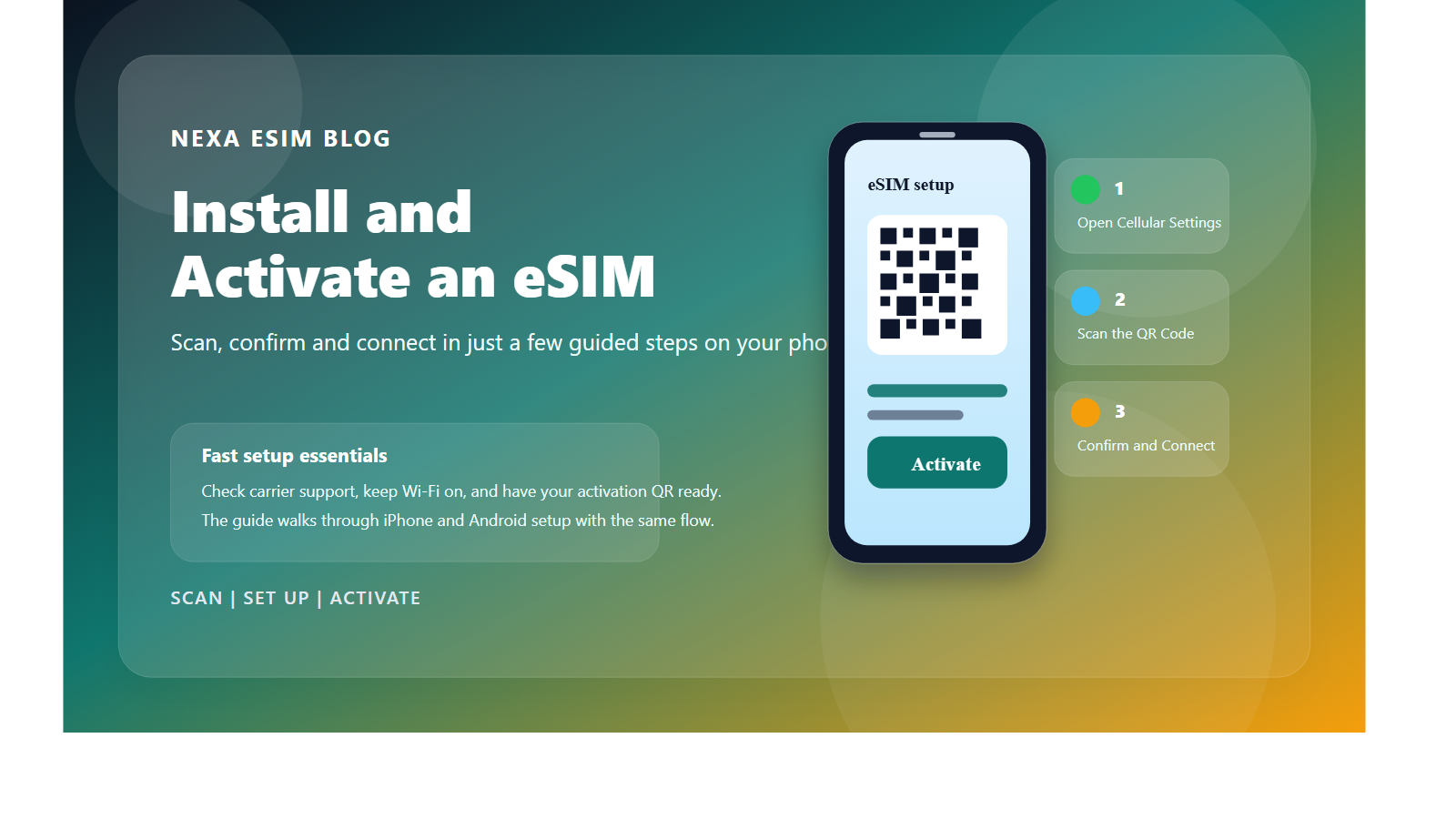
  1. 1
    Open Settings → Cellular (or Mobile Data) → Add eSIM.
  2. 2
    Choose Use QR Code, scan the code from your email and follow the on-screen instructions.
  3. 3
    Give it a clear label such as “Egypt eSIM”. Keep your primary SIM as the default voice line if you need calls or OTP messages.
  4. 4
    When you arrive in Egypt, select the eSIM for Cellular Data, enable Data Roaming for it and turn off “Allow Cellular Data Switching”.
Samsung, Google Pixel & Android

Install eSIM on Android

  1. 1
    Open Settings → Connections → SIM manager. On Pixel: Network & internet → SIMs.
  2. 2
    Choose Add eSIM and scan the QR code from your order email.
  3. 3
    Select the new eSIM for Mobile data. Keep your primary SIM for calls and SMS if needed.
  4. 4
    At your destination, turn on the eSIM and Data roaming. Leave network selection on Automatic unless support asks you to choose a carrier manually.

After installation, keep the travel eSIM turned off until arrival if the plan should not start yet. Most plans connect automatically when they first reach a supported network in Egypt or the purchased coverage area.

Fix an eSIM with no Internet or no network connection

Follow these steps in order so you change only one setting at a time. After each step, wait 30–60 seconds and check the signal indicator and Internet access again.

1Turn on eSIMLine is active
2Select data lineUse the correct eSIM
3Enable roamingFor the travel eSIM
4Refresh networkToggle Airplane Mode
The eSIM is installed but there is no Internet connection

The most common cause is that the phone is still using the primary SIM for data or Data Roaming is disabled on the eSIM.

  1. Confirm that the eSIM is enabled and selected for Cellular/Mobile Data.
  2. Enable Data Roaming on the travel eSIM. You do not need to enable roaming on your primary SIM.
  3. Turn off Wi-Fi, enable Airplane Mode for about 20 seconds, then turn it off and test mobile data.
  4. If the plan requires an APN, enter the APN shown in the email or plan details. Leave username and password blank unless instructed otherwise.
  5. Restart the phone and check that the plan still has validity and high-speed data remaining.
The phone shows “No Service” or cannot register on a network

Make sure you are in a country included in the plan. Open Network Selection, choose Automatic and wait 1–3 minutes.

If there is still no signal, turn off Automatic and try each supported carrier: Etisalat Egypt, Orange Egypt (EMS). Wait at least one minute after each selection.

No supported carrier appears in the network list

Move to an open area, toggle Airplane Mode, restart the device and search for networks manually again. Confirm that your current country is included in the exact plan you purchased.

If other SIMs also have no signal, local coverage may be the cause. Try another location before changing the APN or deleting the profile.

The QR code is invalid, already used or cannot add the eSIM

Make sure the phone has Wi-Fi, supports eSIM, is carrier-unlocked and the QR code was not installed on another device. Check the SIM list because the eSIM may already exist under Travel, Secondary or the provider name.

Do not keep scanning the code and do not delete an eSIM that already appears. Capture the error and contact support with your order number. Never post the QR code publicly.

There is signal, but the connection is slow or unstable

Check remaining high-speed data, switch between 5G Auto and 4G/LTE, and move away from basements, trains or crowded areas. Speed depends on the device, location, network load and plan policy.

Temporarily disable VPN or custom DNS apps. On a multi-country plan, network registration after crossing a border can take several minutes.

Should I delete and reinstall the eSIM when something goes wrong?

No. Many QR codes allow only one installation. Deleting the eSIM may make it impossible to reinstall. Keep the profile and contact NexaEsim before resetting network settings or deleting it.